Markdown is the future
Markdown — the simple formatting language — has become the universal interchange format between humans and AI. As Anil Dash put it in January 2026:
“The trillion-dollar AI industry’s system for controlling their most advanced platforms is a plain text format one guy made up for his blog.” — Anil Dash, “How Markdown Took Over the World”
If you’ve ever written a blog post, you’ve probably written in Markdown (almost every blogging platform supports Markdown formatting). Slack allows Markdown in its messages, and if you’re having in-depth conversations with an AI agent, it’s almost definitely responding to you using Markdown. All the major AI platforms do it, and people seemed to like it so much that researchers measure “Markdown Awareness” of different LLMs as a quality dimension.
One way to track the rise of Markdown is through the rise in popularity of Markdown parsers.
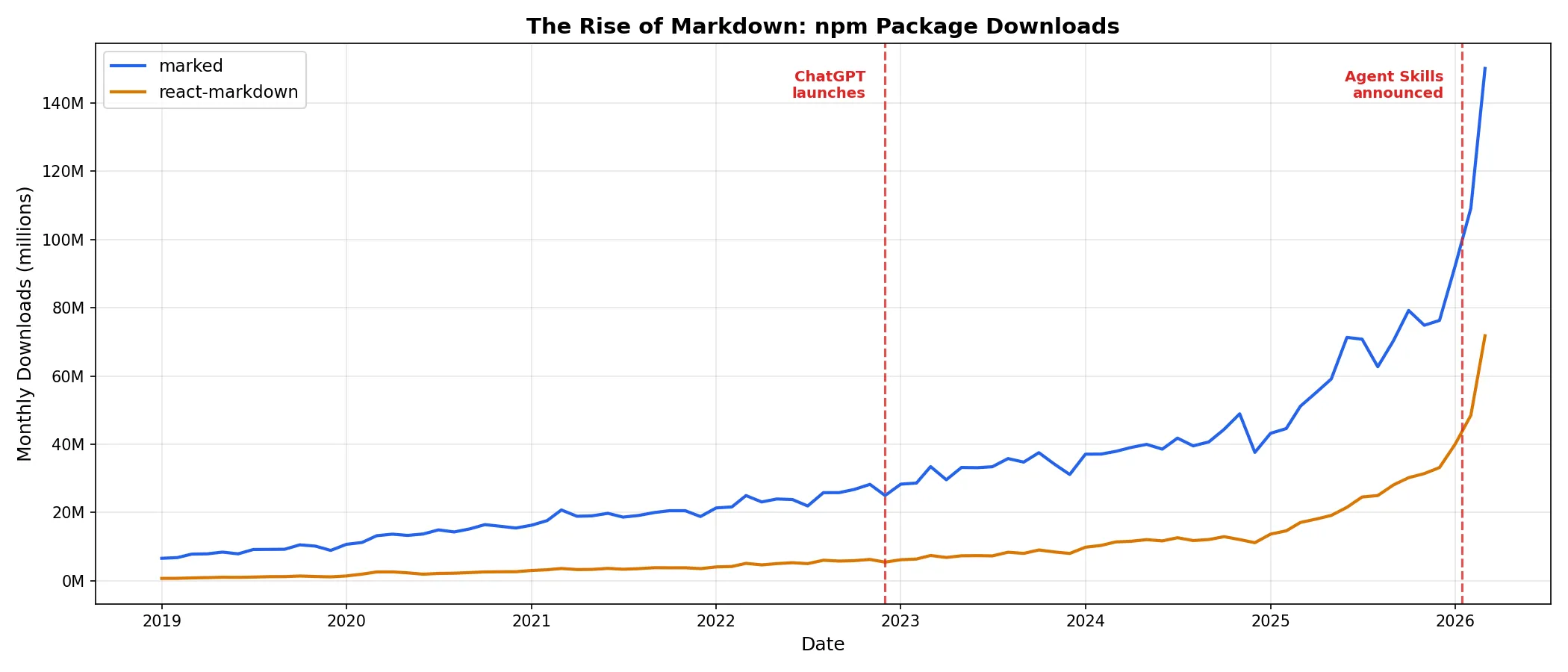 The chart above shows the number of monthly downloads of the Markdown parsers marked and react-markdown.
Now, your agent is talking to you using Markdown, but if you’re using agent skills, then you’re using Markdown to talk to your agents. Since agents are getting so good at reading and writing Markdown, it makes sense to start using Markdown wherever possible.
Blogging
As an example, this blog is written in Markdown using Astro. My academic website was written in Markdown and compiled with Jekyll (before ChatGPT was released). Even if you’re not creating your web content in Markdown, Cloudflare is probably turning it back into Markdown for LLMs to read.
Note-taking
I’ve started using Obsidian for note-taking, and it’s been great. Even if you don’t integrate with an LLM, this approach has two appealing design principles:
- “File over app” — Your files are important. That’s where the content lives. Your content should not be tied to a specific app.
- “Local-first software” — Prioritizing local data and tools (over cloud) means you can work efficiently and privately.
But if you can integrate your Markdown notes with an LLM, you get a “second brain” (unlike Desi’s age, you should google it). Tools to integrate agents like Claude or Copilot with your Obsidian vault are quite popular.
Creating Slides
AI agents still don’t do a great job creating slide decks in PowerPoint or Google Slides, but they’re great at writing Markdown, and you can make your slide decks in Markdown using tools like Marp or Slidev. If you want your agent to help you draft or edit your slides, you should definitely think about moving away from PowerPoint or Google Slides.
Academic papers
Sadly, most academic research is published as PDFs, and agents don’t parse scientific PDFs very well — especially when the paper contains math or figures. But if you’re using Claude to help with your research, you’re probably already taking notes in Markdown format so you can pass information back and forth. If we want to get the full benefit of AI to improve scientific knowledge, we should start creating Markdown versions of scientific reports. This would be analogous to the way some web developers are starting to publish Markdown versions of their sites through llms.txt.